Use the runner as a signal, then open the numbers
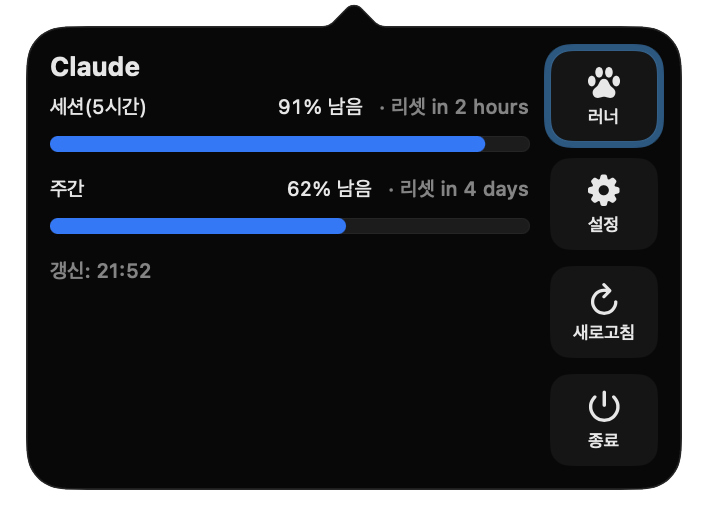
Repeatedly checking a dashboard interrupts the coding loop. RunDog keeps a small runner in the menu bar: faster means less quota remains. When it speeds up, click it to inspect the exact session and weekly values and their reset times.
- Session allowance
- Remaining usage and its reset
- Weekly allowance
- Weekly remaining usage and reset
- Model rows
- Model usage included in the provider response
Connect Codex
- Open RunDog and click a menu bar runner.
- Choose Codex login to open the OpenAI approval page in your default browser.
- Sign in with your own account and approve access.
- RunDog completes sign-in automatically after browser approval.
- Confirm that quota and reset times appear.
Unlike the Claude flow, there is no code to copy and paste.
Privacy
The app has no analytics, advertising, or tracking SDK. Tokens stay in the Mac Keychain. Usage requests go directly from your Mac to the provider, and account identifiers, tokens, and usage are not sent to the developer.
Automatic refresh and manual refresh
Once connected, Codex usage is fetched again every 60 seconds. Polling pauses while the Mac sleeps and resumes after wake, so right after waking you can either wait for the first refresh or press refresh in the popover to read the values immediately. If the OpenAI authentication expires, RunDog shows a login-needed state instead of leaving stale numbers on screen.
Reading the session and weekly allowances together
Codex also applies a short-cycle session allowance and a longer weekly allowance at the same time. The popover shows each with its own remaining percentage and reset countdown, and lists model rows when the provider response includes per-model usage. A low session value is fine to finish the current task when its reset is close, but when the weekly value is nearly exhausted it is safer to check the reset time before starting anything large. Runner speed follows the tighter allowance in stages, and the runner sleeps until the next reset once the limit is fully used.
When browser approval does not complete
- The approval page does not open — RunDog uses the macOS default browser. Make sure it is available and press the Codex login button again in the popover.
- Approved, but the app does not switch to signed-in — RunDog completes sign-in automatically after browser approval. If nothing changes after a few seconds, close and reopen the popover; if it still does not change, start the login again.
- Switching to another OpenAI account — sign out from the account menu in the popover, switch accounts in the browser first, then sign in again.
- Login-needed keeps returning — the stored token has expired. Sign out and connect again; a fresh token is stored in the Mac Keychain.
Watching Claude and Codex side by side
With both services connected, two runners share the menu bar. The RunDog settings window lets you enable the Claude and Codex runners separately and tint them differently — rainbow, 13 color presets, the macOS accent color, or a hex code you type yourself — so each is recognizable at a glance. You can also flip the running direction and pick a different runner per service from the eight built-in runners or your own PNG-frame runners. When one runner falls asleep, move work to the other service and return once its reset passes and the runner wakes up again.
- Runner visibility
- Enable Claude and Codex runners separately
- Color coding
- Rainbow, 13 presets, accent color, hex input
- Runner choice
- Eight built-in runners plus custom PNG-frame runners